Send 10–100 USDT to the exchange address on TRC20. After receiving your USDT, we usually send the exchanged TRX within 3–60 seconds.
Rate:Live Binance and OKX prices
Fee:0.5%
Per-transaction limit:10–100 USDT
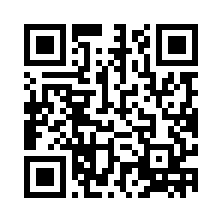
Exchange address
TYY37z1FGyw2qo8EDirhSo8VRgMfQHHHHH
Pay from the wallet that should receive the TRX. The exchanged TRX goes back to that address.
Important: Use TRC20 only and send 10–100 USDT per transaction. Transfers on another network or outside this range cannot be exchanged.
How to exchange USDT for TRX
- Copy the exchange address or scan the payment QR code.
- Send USDT on TRC20 within the per-transaction limit.
- Check the sending address for the incoming TRX transfer on TRONSCAN.
Exchange FAQs
How much TRX will I receive, and what is the fee?
trxRent.io uses live Binance and OKX prices as its reference when it receives the USDT. A 0.5% exchange fee applies. The 0.5% exchange fee is separate from any network fee for sending USDT.
Can I choose a different address to receive TRX?
TRX is automatically sent to the address that sent the USDT. Use the address where you want to receive the TRX.
What if my wallet says I have insufficient TRX?
If you can’t send USDT because you’re short on TRX, transfer a small amount of TRX from another wallet, or buy TRX with fiat and withdraw it to your wallet.
What if I have not received TRX from an exchange?
Check that the USDT transfer succeeded, used TRC20 and was within 10–100 USDT. Look for the TRX payment at the actual paying address. Other networks or amounts outside the limits cause the exchange to fail. Email the transaction hash, address and amount to support@trxrent.io for review.